Affichage des articles dont le libellé est gaming console. Afficher tous les articles

dimanche 12 février 2017

Forget Half-Life 3: Valve is making three full-on VR games

Forget Half-Life 3: Valve is making three full-on VR games


While the wait for Half-Life 3 continues, Valve boss Gabe Newell had some good 
news to share for VR enthusiasts. The company behind the Left 4 Dead and Team Fortress franchises is working on not one, but three "full" VR games.
"When I say we're building three games, we're building three full games, not experiments," Newell told Eurogamer, with the new titles being built using the Source 2 and Unity engines.
Valve, which worked alongside HTC to develop the room-scale HTC Vive VR kit, is looking to build brand new IP around virtual reality experiences, rather than redeveloping its existing, popular titles.

Enough with the ports

"VR is not going to be a success at all if people are just taking existing content and putting it into a VR space," said Newell. 
"One of the first things we did is we got Half-Life 2 and Team Fortress running in VR, and it was kind of a novelty. That was purely a developer milestone, but there was absolutely nothing compelling about it, the same way nobody's going to buy a VR system so they can watch movies."
So while VR reworkings of classic Valve titles is unlikely, it means the company will be working full-on with high-end virtual reality experiences.
"It's about taking bigger leaps forward with the kinds of games that we can do," he added.

Exponential improvements

From the sounds of Newell's comments, he has no qualms about leaving behind those not willing to invest in the pricier end of the VR market. For Valve, it's about building a compelling enough VR software experience to coax gamers to more expensive hardware, rather than initially reducing the hardware cost at the expense of showstopping software potential.
"Once you've got something, the thing that really causes millions of people to be excited about it, then you start worrying about cost reducing. It's sort of the old joke that premature cost reduction is the root of all evil," he said.
Newell's comments echo those of Elon Musk, who saw that electric cars had to become a premium, desirable, product in order to become a viable product category in the long-term. 
But it may not be the current generation of VR headsets that Newell is aiming at - working closely with the hardware manufacturers, Newell suggests that massive improvements to display technology will power Valve's forthcoming VR experiences.
"You'll actually see the VR industry sort of leapfrogging pretty much any other display technology in terms of those characteristics. It's probably not obvious from the first generation of products, but you'll start to see that happening like in 2018-2019," he said.
With that 2018-2019 window in mind then, it's probably not quite time to hold your breath for Valve's new titles. This is a company that takes its time to craft its next big thing, and doesn't shy away from scrapping many months of prototyping work entirely.
But it's heartening to see Valve so invested in the emerging tech. After an exciting start, the amount of jaw-dropping VR experiences has somewhat plateaued. Valve throwing its hat into the ring fully could be the jumpstart virtual reality needs.

samedi 11 février 2017

Nvidia GeForce GTX 1060


Nvidia GeForce GTX 1060 

WHAT IS THE NVIDIA GEFORCE GTX 1060?

The Nvidia GeForce GTX 1060 is the graphics card that PC builders on a budget have been waiting for. Unlike Nvidia’s top-end GTX 1080 and GTX 1070 cards, however, the GTX 1060 faces competition from AMD in the form of the Radeon RX 480.
With competition comes aggression, and the GTX 1060 is far closer to the RX 480 in terms of price than most were imagining. It’s more expensive and more powerful – but is it worth it? As it turns out, if you have the extra cash then, yes, it is.
Update: Since my original review of the GTX 1060, Nvidia quietly launched a 3GB, slightly less powerful version of the card. The 3GB GTX 1060 still uses the same GP106 GPU as the most expensive version but with slightly slower clock speeds and fewer CUDA cores. I have started to test two models that are physically identical (but with the different number of CUDA cores and memory) and so far the results are largely as expected.
The 3GB model appears to be between 2% and 10% slower than the 6GB version in most games I tested, although there is an outlier in the form of Rise of the Tomb Raider that resulted in a 1440p benchmark that was nearly 20% slower. Trusted won't be releasing full results until I've conducted further analysis, so stay tuned for my full comparison.
My original review continues below.
Video: Nvidia GeForce GTX 1060 review
0:00
/
2:50


NVIDIA GEFORCE GTX 1060 – TECHNOLOGY

The GPU is based on a new Nvidia chip, the GP106. The headline-grabbing GTX 1070 and GTX 1080 cards both used the GP104.
So as far as chip design is concerned, instead of taking the form of a “binned” GP104 – a chip that wasn’t good enough to be a 1080 or 1070 – the GTX 1060 is a completely different product.
However, there are things that remain. The GTX 1060 is powered by the same Pascal architecture as its more expensive siblings, and therefore benefits from the 16-nanometre manufacturing process that enables Nvidia to cram more transistors on a given piece of silicon – without increasing power consumption and heat to the same degree.
The GTX 1060 has 1,280 CUDA cores performing the bulk of the graphics legwork, which is more than the 1,024 found on the previous-generation GeForce GTX 960. Intriguingly, the GTX 1060 has a higher boost clock speed than its bigger brother, the GTX 1070, topping out at 1.7GHz.
With a different chip design and fewer CUDA cores, the clock speed won’t translate to better performance, but the GTX 1060 should be able to play games at Full HD and 1440p – and that’s before we get to overclocking.
Away from the graphics chip itself, the GTX 1060 has 6GB of GDDR5 memory. This is 2GB less than the AMD Radeon RX 480, but still more than enough for today’s modern games at Full HD and 1440p resolutions. The memory runs at 8Gbits/sec, which is standard these days for GDDR5 memory.

Nvidia GeForce GTX 1060

Nvidia quotes the card as consuming 120W of power – significantly less than the RX 480’s quoted 150W – so the GTX 1060 should fit nicely into builds where power consumption and heat are limiting factors, such as home-theatre PCs and games console replacements.
The GTX 1060 is Nvidia’s cheapest VR-ready graphics card, which could prove to be a big selling point for those who are considering buying a headset in the next year or so.
Buy Now: GeForce GTX 1060 at Amazon.co.uk (£238) | Amazon.com ($339)

NVIDIA GEFORCE GTX 1060 – DESIGN AND CONNECTORS

I was sent in the Founders Edition of the GTX 1060, which is a more expensive, Nvidia-built version of the card. In all likelihood this won’t be the version you end up buying, since Nvidia’s partners will likely have their own cheaper, custom versions in short order.
Nvidia GeForce GTX 1060
Still, it’s a great-looking card with die-cast aluminium highlights and a black plastic shroud. It isn’t the metal-fest of the 1070 or 1080, but it looks exciting nonetheless.
It’s just 9.8 inches in length, with just under a third of the length a result of an extended plastic shroud that contains some of the cooling kit and the fan. Expect third-party manufacturers to produce extremely compact versions of the 1060, with cards suitable for ultra-small desktops and living-room PCs.
You get three DisplayPort connectors, an HDMI 2.0b port and a DVI port here. The DisplayPort 1.4a connectors are ready for HDR gaming, too.

vendredi 10 février 2017

PlayStation VR

PlayStation VR


Résultat de recherche d'images pour "PlayStation VR"


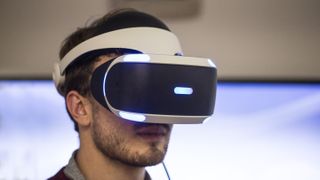
With the PlayStation VR, the world of virtual reality has made its way to consoles in a big way. 
Previous headsets have not only been expensive themselves, but have also required expensive gaming PCs to have enough power to run them. 
The PlayStation VR is different. Not only is the headset itself much cheaper than its competitors, but it also only requires a PS4 console to run. 
Frankly, it's remarkable that such an affordable solution is as capable as it is. 
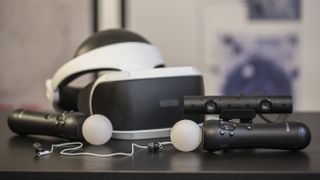
It has its problems – the most notable of which is the fact that you'll need to buy a PlayStation Camera if you don't already own one, and then shell out for PlayStation Move Controllers on top of that to get the full experience – but by and large PlayStation VR proves that not only is console VR viable, but it's actually enjoyable, too.
Over a week's time we tried close to a dozen games on the console, from Rocksteady's impressive (but short) Batman: Arkham VR to the laugh-out-loud funny Job Simulator to the tear-jerking Wayward Sky and even a horror game – Until Dawn: Rush of Blood.
Some of these titles were more fun than others, obviously, but all of them made the same point: PlayStation VR doesn't suck.
Before we go on talking about PlayStation VR's finer points (and foibles), let's get the basics out of the way.
PlayStaion VR Camera and Move
The system is sold in two varieties: the basic PlayStation VR package that only includes the PS VR system, headphones and all cabling required for $399 / €399 / £349 / AUD$549, and a PlayStation VR Launch Bundle which includes the PS VR system, PlayStation Camera, two PlayStation Move Motion Controllers, and a copy of PlayStation VR Worlds for $499 (about £390/AU$655). Another interesting pack-in is the PlayStation VR demo disc that comes with both packages and has a dozen-or-so titles ready for you to check out.
If you don't already own the PlayStation Camera or Move Motion Controllers, the Launch Day bundle is the better bet here – especially considering that you'll get one of the best games on the platform, PlayStation VR Worlds, for free.
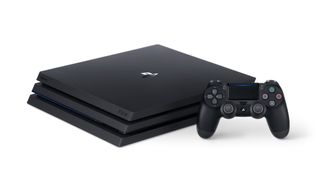
Besides the PlayStation VR unit itself and the PlayStation Camera, all you'll need is a PS4 (the recently released Slim version, the three-year-old original or the ultra-powerful PS4 Pro will do), a PS4 DualShock 4 controller and a 6-foot by 10-foot play space that's well lit, but not too bright.
Setting up the unit can be done in a matter of minutes and the provided instructions offer a clear visual guide to get you up and running.

How does PlayStation VR work?

Like other virtual reality headsets on the market, PlayStation VR has the arduous task of completely immersing you in a video game by producing two images simultaneously and then sending them to a headset a few feet away. But unlike the competition who require expensive graphics cards to get the job done, PS VR can do it using only the PlayStation 4's built-in GPU.
It achieves this by using the PlayStation Camera to track nine different points of light on the headset and the lights on either the Move controllers or on the DualShock 4, depending on which game you're playing.
It's surprisingly accurate given the fact that it's only using a single camera to track what's happening ... but it's not foolproof by any stretch of the imagination. We'll cover performance in detail in a minute, but be prepared for the camera to lose track of the controllers. A lot.
But the real bummer here is that because Sony only uses one camera instead of two, it's harder for PlayStation VR to track you if you get up and walk around than it is for a system like the HTC Vive which can offer true room-scale VR. That said, it still can support you if you decide to get up and wander around, but don't expect to take more than a few steps in any direction without a warning from the system that you're straying too far away.
To that end, most PlayStation VR games can recommend that you stay in one of two positions, either sitting down or standing up and stationary. If you're prone to motion sickness, sitting down might be a bit more comfortable, however, certain games are definitely better played on your feet.
PlayStation VR
Depending on where and how you angle your camera, switching between the two might not be so easy, so it's best to find an angle that covers the majority of the room in case you want to switch from one to the other without having to get up, move the camera and recalibrate.
But let's back up. Up until now, I've thrown the words "VR" and "virtual reality" around a lot and haven't provided much explanation for them.
VR has existed in one form or another for decades, but the modern version of the technology is more immersive and less nausea-inducing than it's ever been. In more or less words, virtual reality is just that – a virtual world that gives you the experience of being somewhere else in a different time, at a different place, sometimes as far as an alien world, all without ever leaving your home.
And yes, it's just as cool as it sounds.
If you want to be specific about it, PlayStation VR can handle 1080p games on its 920 x RGB x 1080 OLED display at either 90Hz (meaning that the image refreshes itself 90 times per second) or at 120Hz depending on the VR game or application.
PlayStation VR
And for those concerned about latency, Sony says that PlayStation VR's response rate is locked in at around 18ms – which is about 0.002 seconds faster than the highest acceptable latency before you would notice the lag in VR.
Those numbers are great, but they're matched by both the HTC Vive and Oculus Rift. The one advantage Sony has that neither Oculus nor HTC can claim is that it's actually a world-class game publisher. While the other two have been trying to create connections with developers over the past few years, Sony already has them.
To that end, Sony is promising 50 new titles on the platform before the end of the year, some of which will be made by Sony's extremely competent first-party studios. (The first of them, PlayStation VR Worlds, is absolutely incredible – you'll go from being put in a shark cage to holding up a bank and end by careening downhill on your back, dodging cars while going faster than the bobsled team in Cool Runnings.)

PlayStation VR on PS4 Pro

There's also another piece of hardware to consider when looking at buying a PlayStation VR, and that's Sony's brand-new, ultra-powered PS4 Pro. 
With additional processing power, the PS4 Pro is capable of creating an even more immersive virtual reality experience for the games that support it – there's around 30-or-so titles at the moment, with about 15 more coming before the end of the year. 
The improvement PS4 Pro promises can take many forms – from more detailed textures to better draw distances, and even a small reduction in graininess. The advantages differ from game-to-game, and PS4 Pro is currently setup to only support games where the developer has enabled "Pro Mode", a hardware boosting technology that tells the PS4 to use extra processing power.
While writing the PS4 Pro review, we got the chance to try the upgraded hardware with the PlayStation VR and the results were noticeable, if a bit underwhelming.
There's definitely a distinct difference between PS4 and PS4 Pro versions of VR games, however, it's probably not one that can be spotted by the unwitting non-techie – it's something that you can only spot if you're paying close attention to how certain textures look in-game or how objects look in the distance. Lag felt less prevalent on the Pro system though, in all fairness, it wasn't something we felt was a major problem while using the standard issue console. 
Whether the minor improvements are worth paying extra for the more powerful hardware is ultimately a decision we'll leave up to you, however it's our opinion that you can get by with a standard PS4 just fine.
To read about PlayStation VR's games, performance and design in more detail, head on over to the next page.

mardi 7 février 2017

Sony PS4 (Slim)

Sony PS4 (Slim)

Résultat de recherche d'images pour "Sony PS4 (Slim)"


The PS4's recent update has seen the existing console that we've grown to know and love, shrunk down into a significantly smaller chassis. 
Beyond its size, the new console is very similar to the existing PS4. It's got the same slanted, angular design, and naturally runs exactly the same games. 
The one change is the omission of the original console's optical audio port, which might frustrate those who rely on the port to output audio to their surround sound setup. 
It's smaller, it runs quieter, it's more power efficient and – if you live in Europe or Asia – it's available in Glacier White, but is it worth upgrading to? Moreover, if you're looking to buy the console for the first time, is this the one to go for? 
It'd be an easier decision if Microsoft's Xbox One S hadn't significantly raised the bar by packing a 4K Blu-ray player into the Xbox One, as well as adding 4K upscaling and HDR functionality to its games. 
Meanwhile, further complicating the decision, the 4K PS4 Pro has just launched, bringing improved performance to the PS4 ecosystem – though the slim PS4 works more or less identically to the existing console.
The slim retails at £259 / $299 / AU$599.99 for the 500GB model, with a 1TB model expected further along down the line.
The PS4 Slim might have entered the fray as Sony's budget PlayStation offering, but that doesn't mean it's scrimping on its specs. In all key areas it matches the original PlayStation 4 console, and at many points outperforms it too.
It's also a far smaller console, shrinking the machine down by almost a third in volume, knocking 16% off the original's weight and offering notable improvements in both power draw and noise output.
  • Want to know how the console stacks up against the PS4 Pro? Check out our guide to the PS4 Pro vs PS4

The best PS4 games are among the finest available on any platform at the moment, with showstoppers like Uncharted 4 and Bloodborne the envy of PC and Xbox One gamers alike. They'll all be compatible with the new PS4 Slim, as will every game going forward – Sony made it explicitly clear that every game for the PS4 Pro will work here, too.
On top of the games themselves, the PS Plus network offering is as good a deal as it's ever been, allowing you to partake in competitive or cooperative online multiplayer play and offering up a selection of three free games on a monthly basis too.
In terms of competition, the PS4 Slim really only has two rivals – the existing PS4 and the Xbox One S. Nintendo can't really compete with its Wii U (though it'll be interesting to see what the so-called Nintendo NX brings to the table).
And it's against the Xbox One S where the PS4 Slim has its toughest fight. Only a tad more expensive, the Xbox One S looks great, has a fine selection of its own games, and comes packing a killer 4K Blu-ray player built in, making it a far more rounded media player than the PS4 Slim. For the time being, the Xbox One S has the edge with HDR color support too, though a firmware update will bring this to all PS4s shortly, levelling the playing field.
But what's on show here is still very, very cool. Should you buy the PS4 Slim? Read on to find out.

Design

It may be hard to remember now, seeing how much joy gamers have gotten out of the original PS4, but its off-kilter shape was met with some raised eyebrows when it was first revealed three and a half years ago.
2016's slim PS4 more-or-less retains the core visual identity of the first PlayStation 4, but shrinks everything down into a more dinky parallelogram package, with newly-rounded edges.
Whereas the original PlayStation 4 measured 27.5 x 30 x 5.3 cm, the PS4 Slim is just 26.5 x 26.5 x 3.8 cm. That's roughly a third smaller than what the original measured up as, and its weight is comparably lighter, too.
PS4 Slim
Whereas the first PS4 had a finish that mixed shiny plastics with matte ones, the PS4 Slim goes with a simple matte black finish all over. It also drops the top-mounted colored light bar indicator - showing sleep, wake and off statuses - in favor of small illuminated dots over the power button. These are more difficult to see, so be careful to check them carefully before unplugging the console from the wall, or risk corrupting your data.
The disk drive slot remains front-facing, sitting above small, physical power and eject buttons. More recent revisions of the PS4 also featured physical buttons on the console, but it'll be a marked difference for gamers used to the launch edition PS4, which favored touch-sensitive controls instead.
Two USB ports sit on the front of the console, as was the same on earlier PS4 models. But they're now spaced much further apart, making them slightly easier to plug into, and possibly making space for the PS VR headset's processing unit.
PS4 Slim Front
Though a 1TB model is on the way, the PS4 Slim launches with a 500GB hard drive. That's pretty small considering all games require a mandatory install, some tens of gigabytes in size. But move around the back of the 2016 PS4 Slim and you'll find a dedicated panel for opening up the console, allowing a user to manually install a larger hard drive in a much more convenient way than the original PS4 did.
Also on the back you'll find the power plug socket (no need for an external power brick here), a HDMI port, the PlayStation Camera's expansion port (set to get more use once the PS VR virtual reality headset launches) and an Ethernet network jack socket.
The only casualty of the slimmed-down design is the Optical Out port on the rear. While HDMI will suit the needs of many gamers when it comes to carrying audio signals, the Optical Out port will be missed by those hooking up older home cinema receivers, or souped-up gaming headsets.
PS4 Slim Rear
The slim PS4 has lots of nice design touches dotted around its chassis though. The iconic Square, Triangle, Circle and Cross symbols of the PlayStation brand are stamped into the side of the console (with the Circle acting as a fixture for those wishing to stand the console upright with a base accessory). And those same symbols are found stuck to the bottom of the new PS4, acting as feet to raise the machine off a surface for improved airflow.
All in, it's a well considered design the complements the existing range, markedly justifying its "Slim" street name.

Setup

Setting up the slim PlayStation 4 is very easy, especially if you're upgrading from the original PS4, or even a PS3 since you can use the same cables, removing the need to stretch behind your TV.
Simply plug in the included HDMI and power cables and connect to the internet to download the console's various patches and updates.
Alternatively, you are able to skip Wi-Fi or ethernet altogether and just pop in a game. Unlike the Xbox One, you can get to the homescreen without initially connecting to the web and patching.
Once you do connect to the internet, you'll need to let the PS4 update before you can make purchases from the store or play online.

Media

Since the very first PlayStation, Sony's home consoles have led the charge when it comes to media playback support. The PS One made for a great CD player, the PS2 was many gamers' first DVD player, and the PS3 their first Blu-ray deck and USB playback device.
The PS4, while not introducing a new format of its own, picked up the baton passed by the PS3, offering wide-ranging streaming service support, Blu-ray and DVD playback, USB media functionality and even banging out the tunes with its own Spotify player.
What the PS4 Slim doesn't do, however, is offer an answer to the Xbox One S's 4K Blu-ray player. It instead sticks with the original PS4's standard full HD Blu-ray player. It's still a strong deck, but anyone looking to show off their 4K TVs with the new PS4 will be disappointed. It's a feature that's set to be notably absent from the PS4 Pro, too.
You could argue that, with 4K TVs a relative luxury for gamers at the moment, it's not a desperately needed feature, especially if it keeps the overall cost down. But it will age the console, preventing it from being fully future-proofed. What's perhaps more annoying is the complete removal of the optical out audio socket, which could cause headaches for those with older AV equipment.
However, one upgrade that is coming to the entire range of PS4s along with the PS4 Slim is HDR support. It adds greater detail to light sources in an image, and is considered the next big thing in TV tech. The roll out is still in the pipeline, so we've not been able to test it yet. But rest assured that the PS4 Slim will support high dynamic range shortly.
All other streaming services and apps featured on the PS4 return for the PS4 Slim. They include (but are not limited to) Netflix, Amazon Prime Video, as well as BBC iPlayer and TV from Sky in the UK, and HBO Go and Hulu in the US. Sony's own movie rental platform is available too if you're looking for the latest Hollywood releases. YouTube is available, as is Twitch game streaming, and a Spotify Connect-enabled version of the popular music streaming service, letting you control tunes on your telly from the comfort of your smartphone.