Affichage des articles dont le libellé est television. Afficher tous les articles

mercredi 15 février 2017

Hands on: Panasonic EZ1002 OLED review


Hands on: Panasonic EZ1002 OLED review


It’s rare that we find ourselves getting too excited by a television’s sound set-up, but we did exactly that when we first laid eyes on Panasonic’s new OLED television, the Panasonic EZ1002, which was announced at CES 2017. 
TODO alt text
The new set is Panasonic’s flagship television for 2017, and is expected to be available by around June 2017, at a price that’s yet to be announced. The set will have the model number EZ1000 in mainland Europe, and EZ1002 in the UK, the latter indicating the model’s support for Freeview Play. 
We got a chance to try the television out for ourselves on the show floor, and we came away impressed not only by the television’s image performance, but also by its audio set-up, which we felt offers a nice compromise between sound quality and thinness. 

Design

OLED’s have always faced a bit of a dilemma when it comes to sound. The television panels themselves can be made as thin as just a couple of millimeters, but it’s rare that you’ll actually see a television make full use of this fact. 
One of the reasons for this is that this amount of thinness is absolutely terrible for speakers, which need a decent amount of space to actually produce sound that isn’t weak and tinny. 
Both the Panasonic EZ1002 and the recently announced LG OLED W7 Signature Series have come up with novel solutions to this problem, although to our mind the EZ1002’s is the slightly more versatile of the two. 
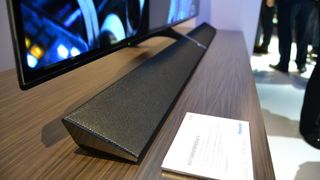
Both sets achieve a thinner profile by separating their speakers from the panel itself, but the specifics of this process differs slightly between the two. 
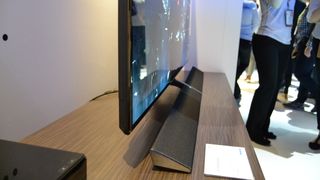
In the EZ1002’s case, the core electronics of the television remain in the body itself, while the W7 puts it all into the soundbar. This means that the EZ1002’s panel itself is slightly thicker to accommodate the circuitry, but because only the sound has been outsourced to the bar, you’re free to swap out the included soundbar with one of your own choosing, which isn’t possible with the W7. 
It might not reach the same wallpaper thinness of the W7, but this design decision means the Panasonic EZ1002’s audio should be much more versatile.
The one caveat is that you'll have to wall-mount the EZ1002 if you want to detach its soundbar, as the speaker is an integral part of its stand. Detach the soundbar and the TV won't sit comfortably on your cabinet at all. 
In fact, if you do end up wall-mounting the EZ1002 you might want to detach the soundbar anyway, as we saw it forced to stick out at a rather ugly angle when it was wall-mounted at the event. 
  • If you’re in the market, check out our guide to the best soundbars around today.

Performance

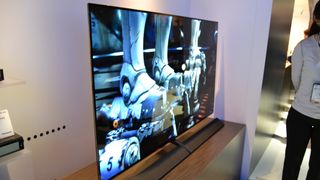
The EZ1002’s image quality hits the high’s that we’ve come to expect from OLED panels. Black levels are delightfully deep and rich, and colors are bright and vibrant. 
Somewhat confusingly, Panasonic is claiming that the television is “the world’s first HDR-capable, Ultra HD OLED TV” which seems odd given that LG’s OLED panels have supported the technology previously. 
It seems that this claim is born out of the EZ1002’s support for the new HDR standard, Hybrid Log Gamma, which broadcasters such as the BBC will be using for live HDR broadcasts. 
However, Panasonic has quickly been joined by LG in offering OLED HLG support, so it was a lead that was short lived. 
Regardless of the HDR confusion, we came away impressed by the HDR capabilities of the EZ1002, which Panasonic claims is able to offer almost double the peak brightness of conventional OLEDs. 
We saw it running next to Panasonic's previous OLED model, and the extra brightness was especially beneficial to the colors, which really popped. 
Color reproduction is excellent, and Panasonic claims this has been enabled by its own Hollywood Lab. We’re always a little sceptical of these claims, but the colors on display with the EZ1002 looked suitably impressive. 
Panasonic also demoed the set next to a recent LG OLED model, although they unfortunately were not disclosing which LG set it was exactly. 
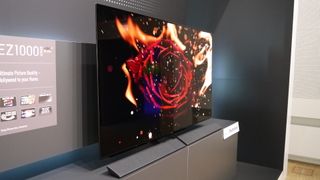
This was done to show off the noise-reduction and color-banding removing capabilities of the set, but it also unfortunately showed off a lack of sparkle in the brightest parts of the image, which looked a little flat in comparison to the LG model. 
The sound quality of the EZ1002 is really excellent. Panasonic is advertising that the set is 'Tuned by Technics' (the company's audio brand), but all we know is that we heard the set running next to an LG OLED from last year and it had a fantastically open and balanced sound in comparison. 
This sheer amount of drivers in the EZ1002 probably have something to do with that. There are two tweeters, two squarkers, and four woofers, which work to create a fantastic sound that's was deep and open. 
You can of course remove this soundbar to replace it, but with it sounding this good only people who are chasing surround sound setups will probably bother. 
All of the EZ1002’s content is accessed through Panasonic’s  'My Home Screen 2.0' operating system, which looks like it might be one of the more intuitive TV OS’s out there. 
Early Verdict

The Panasonic EZ1002 is a great looking OLED that appears to have found a convenient way around the panel technology’s awkward compromise between screen thinness and sound quality. 
The screen itself is sleek and thin, picture quality is excellent, and in particular the set’s deployment of HDR is sure to turn heads. 
The big question is how much this set will end up costing. As Panasonic’s 2017 flagship it’s unlikely to be cheap, but we’re crossing our fingers that it doesn’t leave our collective wallets in too much pain. 

samedi 4 février 2017

LG OLED65E6V

LG OLED65E6V


Image associée
There aren't many TVs that I look forward to every year. At this point I've seen what most 4K Ultra-HD sets are capable of, and while the addition of High-Dynamic Range (HDR) capabilities have reinvigorated my curiosity some, the TVs I actually look forward to having in my home for weeks on end are few and far between.

Résultat de recherche d'images pour "LG OLED65E6V"

But the exception to that rule is LG's line of OLED TVs, which many consider the pinnacle of audiovisual hardware on the market today.
You've read about OLED elsewhere before, I'm sure, so I won't spend much time on it here and I'll just cover the basics. In brief, OLED passes an electric current through organic light-emitting diodes to create color on the screen. Each individual LED can be individually controlled, which means there's no need to have giant lamps sitting on the side of the screen or scattered uniformly across the back of the panel.
OLED screens are more uniformly lit than LCD LED screens, have a better contrast ratio and, in most cases, have richer, more natural colors, too.
LG's OLED65E6V, this year's £4,999 65-inch flagship TV from the South Korean electronics manufacturer, excels at everything I've already mentioned but also surprised me with so much more like built-in Google Cast capabilities, 3D and a surprisingly useful universal search function.

Design

Résultat de recherche d'images pour "LG OLED65E6V"
Now, if I told you that the OLED E6 is but one of four separate OLED series from LG, you might be a bit confused. Worse, though, is LG's naming system for the awesome panels – one letter followed by a 6. What separates the OLED E6 from its siblings –the G6, C6 and B6 – is that it the C6 is curved, but doesn't have a soundbar. The E6 has a 2.2 stereo soundbar, but it's not as powerful as the 4.2 soundbar that's attached to the G6. Meanwhile the B6 is a bit chunkier in the back than the E6's slim picture-on-glass, 2.57mm thick panel. In short, choosing this specific OLED over the others is a matter of screen preference – curved or flat – and whether or not you're prepared to buy an external soundbar.
If you're looking for the hard numbers, the OLED E6 is an ultra-slim 89.4 x 146 x 5.6cm (H x W x D) without a stand, and 89.4 x 146 x 20 with a stand. It's a hefty 22.6kg, making it fairly stable on a wide enough entertainment center and just hefty enough that you'll need a second person if you have any thoughts of mounting it on the wall.
Résultat de recherche d'images pour "LG OLED65E6V"
As for the screen itself, it's a gorgeous all-glass front. In years past, that might've meant that it'd be especially reflective, but the E6 doesn't fall prey to previous models' faux-pas. Even in a bright room, the screen retains a great deal of color and clarity, while a super thin trim gives the E6 a picture frame-esque appearance.
Input-wise, however, the OLED E6 isn't the end-all, be-all of connected home devices. On the left-side of the screen you'll find four HDMI ports with HDCP 2.2 and three USB 2.0 ports, alongside composite and component in, ethernet and optical audio ports. What's there is the basics, enough for most typical home entertainment enthusiasts, but not enough for those of us with multiple games consoles, HTPCs and 4K Blu-ray players.
TL;DR: Great design
Screen sizes available: 55 and 65 inches | 4K: Yes | HDR: Yes | Panel technology: OLED | Smart TV: Yes, webOS 3.0 | Curved: No | Dimensions: 57.5 x 35.2 x 2.2 inches | 3D: Yes | Inputs: 4 x HDMI with HDCP 2.2, 3 x USB 2.0, Component, Composite, Ethernet, Optical Audio

Smart TV (webOS 3.0)

Image associée
While other manufacturers have made the switch away from proprietary operating systems and latched onto third-party sources like Android TV, LG has stayed strong with webOS. This year's iteration of the trimmed-down OS brings a number of welcome refinements but, more importantly, puts the most useful apps front and center.
Pressing the home button on the remote pulls up a long row of subscription-based apps – Netflix, Amazon Prime Instant Video, YouTube, Vudu, Google Play Movies & TV, Hulu in the US and Gamefly. There are a few other heavy hitters on the LG Content Store like Pandora and Plex, but most of the top apps come pre-installed and ready to go.
What surprised me most was the fairly easy to use universal search function that allows you to voice search the LG Content Store and pull up results from almost all the major providers. Use the built-in microphone on the remote to search for The Departed and it will pull up a page with links to Amazon Instant Video, Vudu and Google Play Movies & TV, and give a brief synopsis alongside the cast list.
Voice search, like the platform as a whole, isn't as intuitive or as robust as full-on video streaming boxes like the Roku 3, Roku 4, Chromecast or Amazon Fire TV, but what's there is basic enough for all but the most dedicated of cinephiles to get by.
TL;DR: Good Smart TV capabilities

HD / SDR Performance

By and large, performance across the board is excellent. Like a premium engine, though, the OLED E6 runs better with premium content. But it gets along well enough with standard fuel.
However, after watching a mix of shows from Netflix and playing a fair bit of Xbox One, I can report back that while flesh tones have a bit too much of a red hue for my taste, 90% of HD/SDR content looked good.
Color reproduction is overall excellent. The blacks are as deep and dark as you'd expect, and there's a decent amount of clarity when you have the right 1080p source feeding into it.
That said – and this might sound like heresy to OLED purists out there who believe that LG's panels are the best thing for cable since, well, ever – but the OLED E6 can't always turn a lemon into lemonade. What I mean here is that, if you take an older film – say Back to the Future II – and throw it on LG's £4,999 TV, you might not be all that impressed.
Some upscaled images on the OLED E6's massive 65-inch screen have that overblown look – like there's too much space to cover and not enough pixels to do it. This stretching can create a few jagged edges or, worse, a horrible blotch of colors on the screen.
It's a herculean task to ask a TV to perform well in every single aspect and you can only do so much with the content you're given, but I'd be wrong if I said that there's no room for improvement here.
TL;DR: All right HD/SDR performance

4K / HDR Performance

But while HD/SDR content wasn't everything I had hoped for, 4K/HDR content was everything I had ever dreamed it could be. The image quality can be broken down into a few parts: color, contrast, brightness and motion after you take upscaling out of the equation.
Starting with color, the OLED E6 nails it in every respect. It's a 10-bit panel on the inside and hits the Rec.2020 standard for color depth. All that means is that the colors can take on 1.07 billion hues and that, for the most, part are as accurate as possible to the source.
In terms of brightness, the LG OLED E6 has a minimum peak brightness of 540 nits and is capable of sinking all the way down to 0.0005 nits when the scene's right. Now, if you're concerned that 540 nits won't be enough, remember that OLED – like plasma before it – operates on a different scale. Just because it might not have the peak brightness of the LCD LED you've been eying, doesn't mean it won't be able to wow you when you've got a stark-white scene on the TV.
Contrast, OLED's specialty, is as good as it gets here. Watching Star Trek on 4K HDR Blu-ray I was often awestruck at how rich the CGI space looked and how omniscient the vastness of space appeared on the massive 65-inch screen. The TV fared well with non-Sci-Fi content as well (do yourself a favor and watch The Fundamentals of Caring when you get the chance), with forest scenes or cityscapes appropriately contrasted against one another.
All that said, the one setting I didn't quite like was LG's TruMotion, which often gave slower scenes a soap opera effect if left on. It's meant for fast-motion sequences – car chases, sports, fight scenes and the like – but it's enabled by default which means you'll need to turn it off periodically after it finds its way back on.
TL;DR: Amazing 4K/HDR performance

Sound

Image associée
While most series come with lousy down-firing speakers, LG's OLED E6 sports a tremendously powerful and ultra-crisp soundbar right in the box. The soundbar is actually part of the stand and while it could be removed from the setup and swapped out for a Dolby Atmos 7.1.2 system, the 40-watt 2.2 speaker system is already pretty powerful on its own.
I could spend hours going on about the ample noise it generates (the speaker goes up to 100, and I had mine set at a room-filling 12), how you can custom-tune it to your living room via a the remote's built-in microphone or how it strikes the balance between mids, lows and highs, but I'd rather focus on its other neat feature: Google Cast.
The OLED E6 allows you to share your mobile device or laptop's screen directly to the biggest TV in your house with just a few clicks. There are other TVs with more integrated solutions out there – just look at Vizio's SmartCast series, for example – but if you're looking for crazy deep black levels and this kind of connectivity, LG's OLED is the only place to find it.
TL;DR: Amazing sound quality

Other panels to ponder…

On the subject of competitors, if you're looking for similar sets from Samsung and Sony, you should consider the Sony KD-XD9305, which comes in 55- and 65-inch variations, or the Samsung KS9500 series with the company's proprietary SUHD tech inside it and comes in 55, 65 and 75-inch versions.
You'll save at least £2,000 by picking Sony over LG and around £1,000 by going for the Samsung. That said, expect to lose out on some of that jaw-dropping contrast that only OLED can provide and less screen uniformity when you switch to traditional LED backlights.

Verdict

The LG OLED65E6 is a premium 65-inch TV for a premium price. Like a top-tier engine, it works better when it's being fed high-quality fuel (read: 4K HDR content), but it can get by on standard if you can't find anything better.
Nice touches like the soundbar stand, built-in Google Cast capabilities and 3D add work in tandem with the OLED panel itself to deliver quality second-to-none, save for the company's own flagship Signature G6 OLED TV that comes in at a few thousand dollars more.
If you're looking for a killer 65-inch and have £4,999 on hand, there should be nothing stopping you from going all-in with OLED. That said, if you can live without the 4K capabilities, soundbar and some of those other add-on features, check out LG's 55EC9300 which is a premium 1080p panel with many of the same picture quality characteristics.

Samsung UE55KS7000

Samsung UE55KS7000

WHAT IS THE SAMSUNG UE55KS7000?

The KS7000 series is the cheapest way to get your hands on one of Samsung’s SUHD TVs, which use high-level colour, contrast and brightness technology to deliver a premium HDR picture. In fact, the UE55KS7000 leverages this technology so effectively that it arguably outperforms some of Samsung’s more expensive SUHD sets.

SAMSUNG UE55KS7000 – DESIGN AND BUILD

With its flat – not curved – screen, metallic silver frame, separate desktop feet, and strikingly slim rear, the UE55KS7000 looks very different from Samsung’s other SUHD TVs. But that certainly doesn’t mean it looks worse.
The UE55KS7000 ships with two remote controls: a standard model, and one of Samsung’s new smart remotes. The standard model is compact yet effective, featuring a full array of buttons, while the new smart remote keeps the button count to a minimum and can control almost any AV kit.
Personally, I think the smart remote is so stripped back that it actually becomes complicated to use with other kit, but it’s certainly a handy alternative for controlling the UE55KS7000.
Samsung UE55KS7000

SAMSUNG UE55KS7000 – SETUP

With most Samsung 2016 SUHD TVs I’d usually recommend using the Standard picture preset rather than the default Movie mode for watching HDR. On the UE55KS7000, however, the Movie mode works well. Just ensure the Dynamic Contrast setting is on Medium, and that the TV’s noise reduction systems have been turned off when watching native UHD sources.
I’d also recommend switching the TV’s motion processing to Custom, and setting the judder and blur to level three or four.
Regardless of whether you’re watching HD or UHD, resist the temptation to run the Sharpness setting higher than around 20-25. This can make the image become noisy.
When watching SDR, it's advisable to reduce the Smart LED local dimming feature to low. As for the backlight, keep that set as low as 10 or 11 in a dark room, and around 14 in a bright room.
Samsung UE55KS7000

SAMSUNG UE55KS7000 – FEATURES

The UE55KS7000 is the only 55-inch TV at this price to meet the Ultra HD Alliance’s "Ultra HD Premium" recommended specifications. This equates to a native UHD resolution, brightness levels beyond 1,000 nits and black levels as low as 0.05 nits. Not to mention 10-bit colour playback and a colour range beyond 90% of the digital cinema world’s DCI-P3 standard.
Quantum-dot technology helps it to hit the colour targets, while its contrast performance is bolstered by a "moth eye" filter. This reduces reflections and local dimming to boost the effectiveness of its edge LED lighting system.
Connections are delivered on an external One Connect box. They include four HDR/4K HDMIs, three USBs and built-in Wi-Fi for accessing Samsung’s online services or multimedia on networked DLNA devices.
The UE55KS7000 marshals content through the second generation of Samsung’s Tizen-based interface. This helpfully introduces a second deck of contextual icons to offer more content shortcuts.
Netflix and Amazon are present in their 4K and HDR implementations, and the BBC iPlayer and ITV Hub are on hand too. You can’t currently access the All 4 or My5 catch-up TV apps.
Samsung UE55KS7000

SAMSUNG UE55KS7000 – PERFORMANCE

The UE55KS7000 produces more consistent pictures than some of its more expensive siblings, which is actually down to a less sophisticated local dimming system.
When bright objects appear against a dark background during HDR viewing, the TV responds to the extra source brightness by slightly raising overall brightness levels. As a result, you don't see the distracting vertical bands of light running down the picture that you get on some more expensive models - including the KS9000 series.
This does make dark areas look slightly greyer than they do on Samsung sets with stronger local dimming, but I'd take the more consistent, even backlight of the UE55KS7000 over the distracting light bands on the more expensive edge-lit sets.
While the UE55KS7000 doesn’t reach black levels quite as deep as more expensive SUHD models, its contrast performance remains excellent. Even when dark areas appear alongside very bright ones, blacks still appear deeper than most rivals. It achieves this without losing out on shadow detail or dark colour information too.
This combination helps the UE55KS7000 deliver HDR with more eye-catching impact than any similarly priced 55-inch TV.
The UE55KS7000’s raised black levels do mean it delivers less HDR impact than Samsung’s more expensive SUHD models. But I think that’s a fair trade for the UE55KS7000’s reduced backlight striping distractions.
Samsung UE55KS7000
The UE55KS7000’s colours look exceptionally vibrant, while native UHD sources appear more detailed and crisp than on any other similarly affordable TV. Unlike less bright TVs, the detail remains even in the brightest HDR areas.
The set handles motion well, too, with its minimal judder and blur easily managed by motion processing that generates precious few unwanted side effects. In fact, I found movement on the UE55KS7000 cleaner and more convincing than it is on Samsung’s flagship KS9500 series.
The techniques the UE55KS7000 employs to excel with HDR adapt superbly to SDR’s more limited colour, brightness and contrast too. As a result, you're left with some of the best SDR black levels and colours seen on an LCD TV.
In addition, high-definition sources are upscaled to the screen’s native UHD resolution brilliantly, gaining plenty of detail and sharpness without exaggerating noise. Gamers will be pleased to hear that in its Game picture mode the UE55KS7000 suffers just 24ms of input lag, regardless of whether you’re gaming in SDR or HDR.
Aside from the slightly raised black levels with high-contrast HDR images, the UE55KS7000 has two other picture flaws. First, you don’t have to watch from much of an angle (vertical or horizontal) before contrast takes a significant hit.
Second, there’s sometimes banding in areas of subtle colour blends when watching HDR sources. You can minimise this issue by setting Dynamic Contrast to Medium, but you can’t get remove it completely.
The UE55KS7000’s mostly excellent picture is accompanied by fair to middling audio. The set’s good at reproducing treble details and generally sounds crisp and clean. However, soundstage width and bass are limited, loud trebles can become shrill, and voices sound strained during dense soundtrack moments.
Samsung UE55KS7000

SHOULD I BUY A SAMSUNG UE55KS7000?

In some ways, the UE55KS7000 is uniquely good for its money – especially if you want maximum high dynamic range and Ultra HD impact.
Some HDR colour banding and a limited viewing angle stop it earning an unbridled recommendation, but most of the time it looks gorgeous.
Worthy rivals are few and far between. The Panasonic TX-58DX802 costs almost the same, offers three more inches of picture, sports a striking easel-style design and delivers beautifully subtle, stable images that only fall short of the UE55KS7000 on brightness.
The 58-inch Panasonic TX-58DX750, meanwhile, is an excellent TV with standard dynamic range, priced at £1,049. It isn't as bright or contrast-rich with HDR, though.

VERDICT

Despite a limited viewing angle and some HDR colour banding, the UE55KS7000 proves that genuinely premium HDR thrills don’t have to cost a fortune.

LG OLED55C6V

LG OLED55C6V


WHAT IS THE LG OLED55C6V?

The OLED55C6V is the first TV we’ve seen from LG’s 2016 OLED range. Costing £3,000, it's a 55-inch model with a curved screen, and it arrives packing new support for Dolby Vision’s high dynamic range technology as well as – according to LG – a significantly improved picture performance compared with LG’s already classy 2015 OLED models.
Video: Trusted Explains: All you need to know about TVs
0:00
/
2:59
 

LG OLED55C6V – DESIGN AND FEATURES

Let’s get the divisive bit out of the way first: the OLED55C6V's curved screen. The curve is fairly shallow as such things go, but it’s there and it can, as usual, lead to some distortions and onscreen reflections if you have a bright light source opposite the screen.
On the flipside, the OLED55C6V’s curvature adds a little extra glamour to what’s already a stunning design – not least because curving the left and right edges gently forwards makes it easier to appreciate the incredible thinness (barely 3mm) the OLED panel enjoys over around 50% of its rear.
This view also serves to highlight the gorgeous, glinting silver trim applied to the screen’s outer edges. Basically any LCD screen with aspirations of trying to out-design OLED might as well just pack up and go home.
Connections on the OLED55C6V are effective rather than exemplary, on account of including only three HDMIs when ideally there would be four. Two support Ultra HD and HDR streams, though, and you can playback your multimedia collections via either a trio of USB ports or via the TV’s Bluetooth and Wi-Fi connection options.
The integrated Wi-Fi can also access a decent set of online apps and video streaming options, including Now TV, Netflix and Amazon Video. In past years, LG has fallen a little short when it comes to offering the UK’s most important catch-up TV apps. However, the Korean brand has put that right for 2016 by introducing support for the Freeview Play catch-up platform via a firmware update rolling out to its latest smart TVs as we speak.
All of the OLED55C6V’s smart features and sources are predominantly accessed via the latest version of LG’s webOS platform, which has undergone a few changes. The scrolling "launcher" bar is now longer, so it can host pretty much every app you have. Plus, there's now a new My Content section, into which you can bookmark favourite content to make it easier to return to.
The main point about webOS, however, is that LG appears well aware of the fact that it’s best not to mess too much with something that already works extremely well.
Related: Best TVs 2016
LG OLED55C6
With regards to the OLED55C6V’s panel technology, the key point here is that every pixel in an OLED screen produces its own light level, independent of its neighbours. You don’t have to be Stephen Hawking to figure out that this means OLED TVs have the potential to deliver far superior contrast, much deeper black levels and far more accurately positioned, localised light than their LCD counterparts.
The sort of pixel-level light precision OLED can deliver has become even more important, it seems to me, now that HDR content has arrived on the scene. After all, as LCD TV after LCD TV is proving this year, nothing highlights the shortcomings of using external lighting systems shared over groups of pixels more than the extra light intensity and variation associated with HDR footage.
What’s more, LG claims to have introduced a raft of improvements for 2016 from its already exciting 2015 OLED TVs. Particularly intriguing is new support for the Dolby Vision take on HDR, which adds an extra layer of dynamic metadata for scene-by-scene optimisation. It also introduces a degree of optimisation based on the particular screen being used. LG is the first brand to adopt Dolby Vision in the UK.
The company has also greatly increased the brightness it can achieve in its 2016 OLED TVs – critical when it comes to delivering HDR – while simultaneously claiming to have reduced the issues with light "banding" and sudden black-level loss suffered by many of its 2015 models.LG OLED55C6
Other features of note are support for 3D, using the passive 3D system; sufficient picture setup tools to earn the endorsement of the Imaging Science Foundation (ISF) as a TV that one of its engineers could come and professionally calibrate; and, last but not least, Ultra HD Premium status.
If you're unfamiliar with the latter term, it means the OLED55C6V delivers deep enough blacks, bright enough brights, sufficient resolution – with its Ultra HD panel – and enough of the DCI-P3 digital cinema colour spectrum to rank as a top-quality HDR performer, according to standards defined by the AV industry’s Ultra HD Alliance working group.

LG OLED55C6V – SETUP

To get the best out of the OLED55C6V will involve some tweaking of its settings.
The single most important thing to bear in mind is that you really shouldn’t adjust the TV’s main brightness setting – as opposed to its "OLED Brightness" setting – any lower than 49 or any higher than 52. Slip below 49 and shadow detailing in dark areas starts to become crushed. Push higher than 52 and the trademark ultra-rich black levels of OLED suddenly start to plummet.
I’d also urge care with LG’s rather messy motion processing. I found I achieved the best balance between judder reduction and distracting processing side effects by choosing the TruMotion User mode and setting both the judder and blur compensation to level two or three.
Make sure noise reduction is turned off for all native 4K feeds and good-quality HD feeds, and avoid the "Vivid" picture option when watching HDR, since it leads to excessive "bleaching" of colours and white areas.
Personally, I'd also avoid the HDR Effect mode LG provides to try to convert standard dynamic range content into HDR, since it doesn’t represent colours convincingly – and the set does superbly with SDR content in its native form.